📅 Subscription Only
The Subscription Only billing mode allows users to access chat functionalities exclusively through subscription plans. Administrators define available subscription tiers, and users must select one to gain access to the application.
Managing Subscriptions
Subscription plans are managed in the Admin Panel under Settings > Billing:
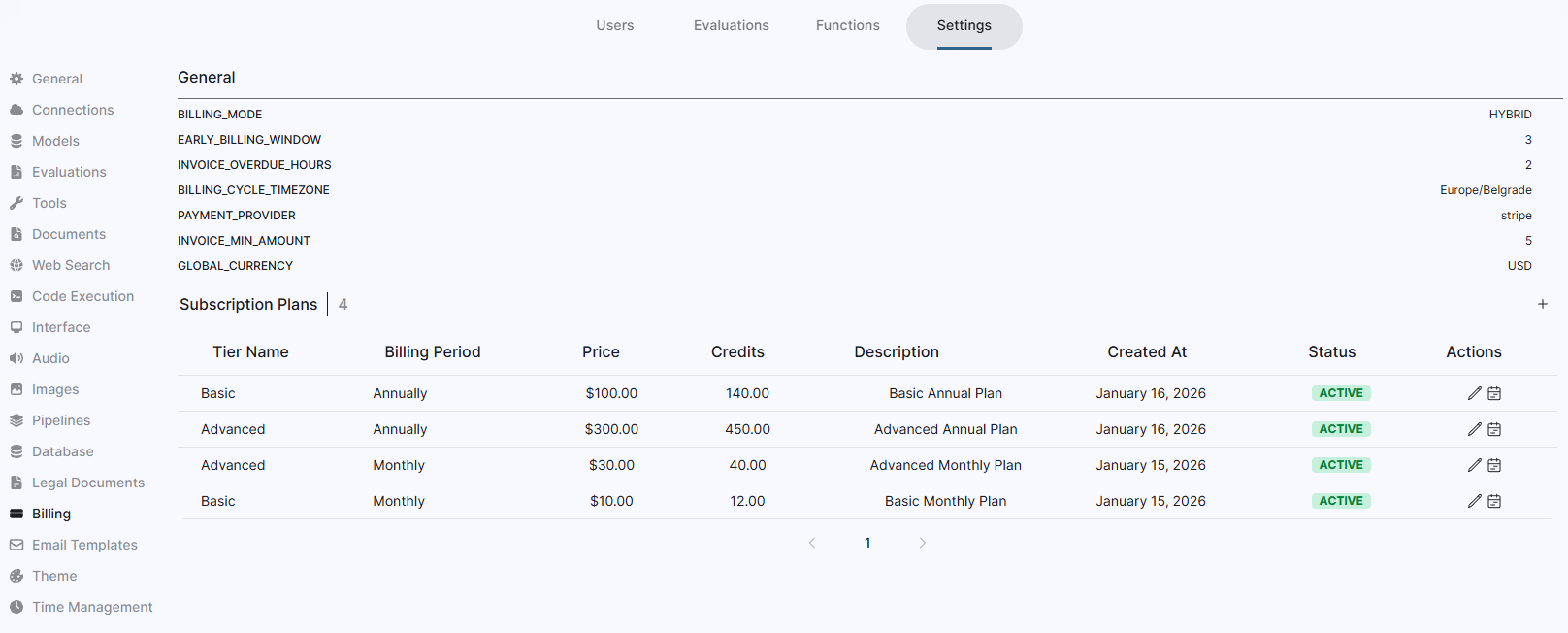
Click the + button above the subscription table to add new plans.
Subscription Attributes
Each subscription plan can define:
- Name: The name of the subscription tier
- Price: The cost per billing period
- Credits: The number of included credits per period
- Period: Billing frequency
- Monthly
- Annually
Due to varying regulations across different countries, price and credit modifications are not allowed through the standard edit interface. Instead, use the price change scheduling feature to set a future effective date. All affected users will receive an email notification with details about the new pricing and credits.
Configure the minimum notice period before a price change can take effect:
MIN_DAYS_BEFORE_PRICE_CHANGE=<MIN_DAYS_BEFORE_PRICE_CHANGE>
User Subscription Flow
When users access the application without an active subscription, they are prompted to select a plan. Plans are displayed in two different categories - Monthly and Annually.
Upgrades and Downgrades
Users can upgrade or downgrade their subscription at any time. The system automatically calculates proration based on remaining credits and time in the current billing cycle.

Recurring Billing
When a user subscribes, their payment method is automatically charged on a recurring basis according to the subscription period (monthly or annually). The system charges users a few days before the end of their current billing cycle.
Configure how many days in advance billing occurs:
EARLY_BILLING_WINDOW=<EARLY_BILLING_WINDOW>
Payment Failures and Grace Period
If a payment fails to process, the user is notified via email and given a grace period to update their payment information. After this grace period, their access is restricted.
Cancellation
Users can cancel their subscription at any time from the Plans screen in the application. Cancellation takes effect at the end of the current billing cycle.